Asus Rog Nuc 2025 Review: Real User Experience After 3 Months
When Intel announced it was stepping away from the NUC (Next Unit of Computing) brand and handing the torch to Asus, I was skeptical. I’ve always been a fan of ultra-small form factor (USFF) machines, but I worried the soul of the NUC—that industrial, enthusiast-first engineering—might get lost in the transition to a more "gaming-focused" brand. I picked up the Asus Rog Nuc 2025 about three months ago to replace my aging desktop tower. I wanted something that wouldn’t take up half my desk but could still handle 1440p gaming and video editing. After ninety days of daily driving this machine, from long work shifts to late-night sessions of Cyberpunk 2077, I’ve found that while it isn’t perfect, it’s a fascinating look at where high-end compact computing is headed.
The First Impression: Beyond the Specs
I remember unboxing the machine and being struck by how dense it felt. It’s small, measuring just under 2.5 liters, but it has a weight that suggests it’s packed tight with copper and silicon. In my experience, most "mini-PCs" feel like toys, but this feels like a piece of high-end audio equipment. I opted for the Core Ultra 9 185H model with the RTX 4070 Laptop GPU. On paper, it sounded like a beast, but anyone who has used a small PC knows that thermal throttling is the real boss you have to beat. I was worried I’d be paying for "Ultra 9" performance only to get "Core i5" speeds because of heat.
Setting it up was straightforward, though I noticed the power brick is absolutely massive. It’s nearly half the size of the computer itself. I found that I had to be creative with cable management to hide the brick under my standing desk. Once it was plugged in and the ROG logo pulsed with its default red glow, I realized this wasn't just a rebranded Intel NUC; Asus had definitely put their own aesthetic stamp on it. The RGB is customizable, but I quickly dialed it down to a soft white light to fit my workspace better. I appreciated that I could turn off the internal backlit logo entirely through the Armoury Crate software, which I did almost immediately to keep the look professional during video calls.
Performance in the Real World: 90 Days of Stress
What I found was that the Asus Rog Nuc 2025 handles daily productivity tasks so easily that it’s almost boring. Moving between 50+ Chrome tabs, Slack, Discord, and Adobe Premiere Pro didn't cause a single hiccup. In my experience, the transition to the Core Ultra architecture with its dedicated NPU (Neural Processing Unit) didn't change my life overnight, but I did notice that background tasks like noise cancellation on my microphone and background blur in Zoom felt "lighter" on the system. The fans barely spun up during these work hours, which was a huge relief coming from a desktop with six case fans.
The real test, of course, was gaming and creative work. I spent a fair amount of time editing 4K 60fps footage from my camera. Scrubbing through the timeline was fluid, though I did notice the fans starting to ramp up during the export process. The sound profile is a low-frequency hum rather than a high-pitched whine, which I appreciate. One thing that bothered me, however, was the initial SSD performance. I noticed that under sustained write loads, the primary drive got quite warm, which lead to some minor stuttering during large file transfers. I eventually added a second, higher-quality NVMe drive in the second slot and moved my project files there, which solved the issue.
When it comes to gaming, I’ve been testing this at 1440p. In titles like Horizon Forbidden West and Alan Wake 2, I found that the RTX 4070 Laptop GPU performs admirably, especially with DLSS Frame Generation enabled. In Cyberpunk 2077 with Ray Tracing set to Medium, I was consistently seeing 70-80 FPS. However, after testing for several hours in a warm room (around 75 degrees Fahrenheit), I did see the CPU clocks start to dip slightly. It never crashed, but I learned that this machine really needs "breathing room." If you tuck it behind a monitor or inside a cabinet, you’re going to lose performance. I ended up placing mine vertically using the included stand, which I found improved the thermal situation by a noticeable margin compared to laying it flat.
Living with the Software and Connectivity
I noticed that the connectivity on the back is excellent, but the front-facing ports are where I have my daily frustrations. I frequently use the SD Express 7.0 card reader, and while it's fast, the placement is a bit cramped if you have a bulky USB-C drive plugged in next to it. Speaking of USB-C, the Thunderbolt 4 support has been a lifesaver. I run a single-cable setup to a secondary monitor that also acts as a hub for my peripherals. In my experience, the Asus Rog Nuc 2025 handles these transitions well, though I did have one week where a Windows update messed with the BIOS settings, causing the machine to fail to wake from sleep. It took a bit of digging in the Asus support forums to realize I needed to roll back a specific driver.
Shop the latest Laptops & Computers picks on Amazon.
Browse Now →The Armoury Crate software is a bit of a "love it or hate it" affair. Personally, I found it a bit bloated. It’s necessary for controlling the power profiles (Quiet, Performance, Turbo), but it often wants to update itself at the most inconvenient times. I eventually settled on using a third-party open-source alternative for light control and kept Armoury Crate just for the fan curves. I was surprised by how much control Asus gives you over the fan behavior, though. You can really fine-tune it if you want a silent office experience, which I spent a Saturday morning perfecting.
A Practical Comparison
To give some context, I’ve compared the Asus Rog Nuc 2025 to its predecessor and its primary rival in the compact gaming space. It’s important to understand where the value lies, as this is a premium-priced machine.
| Feature | Asus Rog Nuc 2025 (Ultra 9) | Intel NUC 13 Extreme | Common Mini-PC Rivals |
|---|---|---|---|
| Volume | ~2.5 Liters | ~13 Liters | 0.5 to 1.5 Liters |
| GPU Power | RTX 4070 (Laptop, 140W) | Desktop Triple-Slot GPU | Integrated or Mobile 4060 |
| CPU Architecture | Intel Core Ultra (Meteor Lake) | 13th Gen Desktop (Raptor Lake) | Various Laptop CPUs |
| Portability | Fits in a backpack | Requires a dedicated bag/small suitcase | Fits in a large pocket/pouch |
| Noise Level | Moderate (Customizable) | Depends on Desktop GPU choice | Often high-pitched/aggressive |
What I Loved and What Frustrated Me
After three months, the "honeymoon phase" is over, and I can look at this machine objectively. It’s a specialized tool. It’s for the person who wants a "sleeper" setup—high-end performance without the high-end footprint. But that constraint brings specific compromises that I had to learn to live with.
Pros:
- Compact Power: It is genuinely impressive to play AAA games at high settings on a machine that I can pick up with one hand. In my experience, it’s the best "performance-to-volume" ratio on the market right now.
- Build Quality: The chassis is remarkably rigid. It doesn't feel like thin plastic; the panels fit perfectly, and the vertical stand is heavy enough to keep the machine from tipping when you plug in cables.
- Internal Expandability: Despite being small, I was able to easily pop off the top cover to upgrade my RAM to 64GB and add that second NVMe drive. I appreciate that Asus didn't solder everything down.
- Silent Productivity: When I'm just writing or browsing, it’s practically silent. I’ve worked in the middle of the night without waking anyone up in the next room, which was a problem with my old tower's pump noise.
- Modern Ports: Having Thunderbolt 4 and 2.5Gb Ethernet makes it a future-proof workstation. I’ve used it with a high-speed NAS and the speeds were exactly as advertised.
Cons:
- The Power Brick: I cannot stress enough how large the 330W power supply is. It’s a "brick" in the literal sense. It makes the "portable" aspect of the NUC a bit of a lie unless you have a deep backpack.
- Coil Whine: In quiet rooms, I noticed a faint high-pitched electrical hum (coil whine) when the GPU is under high load. It’s not deal-breaking when wearing headphones, but for a "silent" build enthusiast, it might be annoying.
- Price Premium: You are paying a significant "tax" for the small form factor. I could have built a much faster desktop for the same price, or bought a high-end laptop with a screen and keyboard included.
- Software Quirks: Armoury Crate can be temperamental. I’ve had issues where it wouldn't remember my RGB settings after a reboot, forcing me to re-open the app to fix the colors.
- Heat Exhaust: The back of the unit gets incredibly hot. I had to be careful not to leave any plastic cables or delicate items directly behind the exhaust vents, as I noticed my desk mat was becoming quite warm to the touch.
Buying Guide: Is This Right for You?
If you are considering the Asus Rog Nuc 2025, you need to ask yourself why you want it. In my experience, there are three types of people who will actually appreciate this machine. First is the "clean desk" enthusiast. If you hate wires and bulky towers, this is the ultimate solution. You can even VESA mount it to the back of many monitors, effectively creating your own high-powered All-in-One.
Second is the "mobile professional" who doesn't want a laptop. I know people who travel between two offices or two homes and already have monitors and keyboards at both locations. Tossing this NUC into a bag is much easier than hauling a full tower, and you get better thermals than most thin gaming laptops. However, remember that you’re carrying that heavy power brick too.
Third is the niche enthusiast who just loves SFF (Small Form Factor) tech. That’s where I fall. I love the engineering challenge of cooling 200+ watts in a tiny box. But if you are a "value" shopper, I’ll be honest: this isn't the best way to spend your money. You can get more raw power for less money elsewhere. You are paying for the miniaturization and the ROG branding. If you do buy it, I highly recommend getting the "Barebones" kit if you can find it, and buying your own high-speed RAM and SSD separately. It's usually cheaper and you'll get better components than the stock ones Asus provides in the fully built versions.
Looking for the best Laptops & Computers deals on Amazon?
See Deals →Thermal Management Tips
One thing I learned over the last 90 days is that you can’t just "set it and forget it" if you want peak performance. I spent a few hours experimenting with undervolting, though the Core Ultra chips are a bit more locked down than previous generations. What I did find was that lifting the unit off the desk surface by just half an inch—or using the vertical stand—dropped my idle temperatures by about 4 degrees Celsius. I also recommend checking the BIOS settings for the "Power Gear." Switching it from "Normal" to "High Performance" in the BIOS itself seemed to provide a more stable frequency during long gaming sessions than just relying on Windows power sliders.
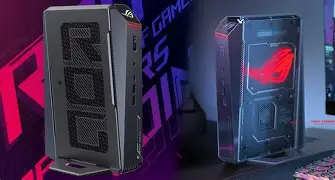
I also noticed that the dust filters, while small, tend to clog up relatively quickly because the fans have to work harder to pull air through the tight internal spaces. I’ve made it a habit to hit the intakes with a bit of compressed air every few weeks. If you live in a house with pets, you’re going to find hair in there very quickly. Keeping those vents clear is the difference between a quiet machine and one that sounds like a jet engine taking off.
Final Thoughts After 3 Months
The Asus Rog Nuc 2025 has become the heart of my home office, and I don't see myself going back to a big tower anytime soon. I’ve grown to love the extra desk space, and the performance hasn't let me down for my 1440p gaming needs. I was surprised by how much I ended up using the front ports, despite my complaints about their spacing. It’s just so convenient to have a powerhouse within arm's reach.
However, it’s not a "perfect" machine. The software can be frustrating, the power brick is a logistical nightmare, and the price point puts it squarely in the luxury category. It’s a "statement" piece of hardware. After using it for three months, I can say that Asus has successfully kept the NUC spirit alive. They’ve managed to take a concept that Intel started and add enough "gamer DNA" to make it feel fresh without ruining the compact efficiency that made the NUC famous in the first place. If you can stomach the cost and the size of the power adapter, it’s a brilliant little machine that punches way above its weight class. Just make sure you give it plenty of air, keep the firmware updated, and maybe invest in a good pair of headphones to drown out the occasional coil whine during a heavy gaming session.
Ultimately, my experience has been positive. I wanted a machine that didn't compromise on speed while fitting into my minimalist lifestyle, and the Rog Nuc delivered on that promise. It feels like a mature product, not a first-generation experiment. While I hope the 2026 version finds a way to shrink that power brick, the 2025 model is a rock-solid foundation for the future of the ROG NUC line.